Showing posts with label Productivity. Show all posts
Viira For BlackBerry App Review
on Friday, April 2, 2010

Organization and productivity are two factors that can make life easier for most of us, but trying to be organized and productive becomes a hassle if done incorrectly. Developers, Karta Mobile, have released an application based on the best selling work-life productivity book by David Allen, called Viira for BlackBerry. It prides itself on being "the most comprehensive BlackBerry GTD (Getting Things Done) app on the market". Viira is uniquely
designed to bring a full-powered,
integrated and always-on GTD organizational system right to your
fingertips and is also a must have for the busy professional and technology enthusiast alike.
Full review after the jump
This app is innovative, to say the very least. It sports a large number of features that can't be found in many other productivity applications.
Projects & Context:


Projects give you the ability to create, group, and manage items that are related to each other. It has built in support for contexts as well (at home, at computer, at work, etc.) You can add emails, tasks, appointments, and reminders to any of your projects.
Email Tasks:


One of the more interesting features of this app is that it gives you the ability to incorporate emails directly into your projects. You can create a Viira task directly from your inbox, assign email tasks to projects or contexts, and even give emails tasks a specific day so that they show up in Viira's Day View. Once you create an email task it automatically embeds a summary of the email to use as a reminder.
Day View:
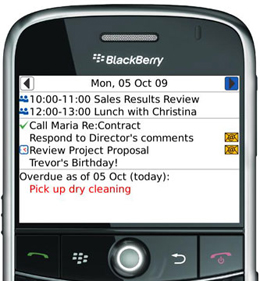

Similar to the day view in the native BlackBerry calendar, Viira's Day View allows you to see all of your tasks in one place. No need to switch back and forth between applications because all of your appointments, email tasks, events, reminders, and day tasks are conveniently organized in the day view to help with your planning. You can use the volume up and volume down keys to assign next actions or re-order your tasks and there is also an area designated to show overdue tasks.
Delegate:


The delegation feature was added in Viira 2.1 and it gives you the ability to send a project or context along with associated tasks, via email. This is a nice feature that comes in handy when you would like to share a lists of tasks or directions with someone else (i.e. - shopping lists, meeting agendas, etc.).
Shortcuts:


Viira is a easy to use application on its own, but it also has an impressive list of shortcuts that make it even easier to use. View list of shortcuts.
Conclusion:
Whether you are the busy BlackBerry professional or the tech-junky, this application can serve your needs in some way or another. It's filled to the brim with useful features that integrate seamlessly with your BlackBerry and Viira's easy to use interface make it a worthwhile application by all means. I guess their slogan is true, because Viira really does allow you to "get things done wherever you are".
Application: Viira
Developer: Karta Mobile
Price: $29.99 or Free 21 Day Trial
Devices Supported: ALL
Viira For BlackBerry App Review
Organization and productivity are two factors that can make life easier for most of us, but trying to be organized and productive becomes a hassle if done incorrectly. Developers, Karta Mobile, have released an application based on the best selling work-life productivity book by David Allen, called Viira for BlackBerry. It prides itself on being "the most comprehensive BlackBerry GTD (Getting Things Done) app on the market". Viira is uniquely
designed to bring a full-powered,
integrated and always-on GTD organizational system right to your
fingertips and is also a must have for the busy professional and technology enthusiast alike.
Full review after the jump
This app is innovative, to say the very least. It sports a large number of features that can't be found in many other productivity applications.
Projects & Context:
Projects give you the ability to create, group, and manage items that are related to each other. It has built in support for contexts as well (at home, at computer, at work, etc.) You can add emails, tasks, appointments, and reminders to any of your projects.
Email Tasks:
One of the more interesting features of this app is that it gives you the ability to incorporate emails directly into your projects. You can create a Viira task directly from your inbox, assign email tasks to projects or contexts, and even give emails tasks a specific day so that they show up in Viira's Day View. Once you create an email task it automatically embeds a summary of the email to use as a reminder.
Day View:
Similar to the day view in the native BlackBerry calendar, Viira's Day View allows you to see all of your tasks in one place. No need to switch back and forth between applications because all of your appointments, email tasks, events, reminders, and day tasks are conveniently organized in the day view to help with your planning. You can use the volume up and volume down keys to assign next actions or re-order your tasks and there is also an area designated to show overdue tasks.
Delegate:
The delegation feature was added in Viira 2.1 and it gives you the ability to send a project or context along with associated tasks, via email. This is a nice feature that comes in handy when you would like to share a lists of tasks or directions with someone else (i.e. - shopping lists, meeting agendas, etc.).
Shortcuts:
Viira is a easy to use application on its own, but it also has an impressive list of shortcuts that make it even easier to use. View list of shortcuts.
Conclusion:
Whether you are the busy BlackBerry professional or the tech-junky, this application can serve your needs in some way or another. It's filled to the brim with useful features that integrate seamlessly with your BlackBerry and Viira's easy to use interface make it a worthwhile application by all means. I guess their slogan is true, because Viira really does allow you to "get things done wherever you are".
Application: Viira
Developer: Karta Mobile
Price: $29.99 or Free 21 Day Trial
Devices Supported: ALL
bhivetasks Blackberry App Review

High Velocity IT let us know about their bhivetasks app for Blackberry. This is something similar to the native Tasks app on a Blackberry but with a lot more features and a better user interface. The app allows you to create task lists with reminders that integrate with your Calendar. The app looks great, and is simple and fast. Hit the jump for a full review and feature list.
When you're looking at the dashboard of the app you have the option of adding a new task, or viewing current tasks. You can view tasks based on their due date, based on custom folders, or based on their priority (low, medium, high). One of the cool features of this app is the fact that from the dashboard, you can start typing and it will search through your tasks, this allows for fast task access.

Here is the screen for adding a task. You of course can name the task, create custom folders to store the tasks in, add alarm reminders, and add a due date. It also has a section to set the priority and add notes. Another great feature is the homescreen icon shows how many pending tasks are in the app when you scroll over the icon. All in all this is a great app and if you're creating a lot of tasks this will help you stay organized. I give this app 4.5 our of 5 stars.
Application: bhivetasks
Developer: High Velocity IT
Price: $3.99
Devices Supported: All Blackberry Devices
OS Supported: 4.5+
bhivetasks Blackberry App Review
High Velocity IT let us know about their bhivetasks app for Blackberry. This is something similar to the native Tasks app on a Blackberry but with a lot more features and a better user interface. The app allows you to create task lists with reminders that integrate with your Calendar. The app looks great, and is simple and fast. Hit the jump for a full review and feature list.
When you're looking at the dashboard of the app you have the option of adding a new task, or viewing current tasks. You can view tasks based on their due date, based on custom folders, or based on their priority (low, medium, high). One of the cool features of this app is the fact that from the dashboard, you can start typing and it will search through your tasks, this allows for fast task access.
Here is the screen for adding a task. You of course can name the task, create custom folders to store the tasks in, add alarm reminders, and add a due date. It also has a section to set the priority and add notes. Another great feature is the homescreen icon shows how many pending tasks are in the app when you scroll over the icon. All in all this is a great app and if you're creating a lot of tasks this will help you stay organized. I give this app 4.5 our of 5 stars.
Application: bhivetasks
Developer: High Velocity IT
Price: $3.99
Devices Supported: All Blackberry Devices
OS Supported: 4.5+